
#1 SmartSoft Video Converter Pro15.11 - Download
You'll be able to download in few seconds.
Publisher Description
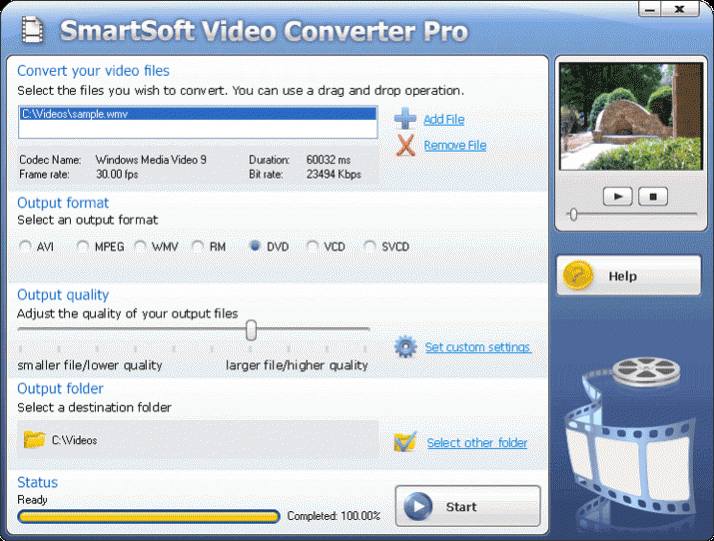
Powerful yet easy to use, it converts between many popular video file formats like AVI, DivX, XviD, MPEG1, MPEG2, WMA, WMV, ASF, RM, RMVB, MOV, QT and more. You can easily burn video files on DVD, VCD or SVCD later - as a movie DVD, not a data disc with mpeg for instance. Converting or burning is easy - just use the attractive, quickly navigable interface to choose the input file, the output format, and click convert. That's all. And, adjust output quality easily if you like, by moving the quality slider to one of many preset options. Or change advanced variables like the bit rate and compression. Either way, you can enjoy your favorite movies - even those you record on your video recorder or web cam - on high quality movie DVDs on your home VCD or DVD players on TV or PC. And share your special moments in multi-media formats over the Internet. SmartSoft Video Converter makes the most of your viewing, opening your home and the World Wide Web to a whole new movie experience.
About #1 SmartSoft Video Converter Pro
This Rippers & Converters program is available in English. It was last updated on 29 September, 2026. #1 SmartSoft Video Converter Pro is compatible with the following operating systems: Windows.
The company that develops #1 SmartSoft Video Converter Pro is 1Smart Soft. The latest version released by its developer is 15.11.
The download we have available for #1 SmartSoft Video Converter Pro has a file size of N/A. Just click the green Download button above to start the downloading process. The program is listed on our website since 2019-11-16 and was downloaded 0 times. We have already checked if the download link is safe, however for your own protection we recommend that you scan the downloaded software with your antivirus. Your antivirus may detect the #1 SmartSoft Video Converter Pro as malware if the download link is broken.
How to install #1 SmartSoft Video Converter Pro on your Windows device:
- Click on the Download button on our website. This will start the download from the website of the developer.
- Once the #1 SmartSoft Video Converter Pro is downloaded click on it to start the setup process (assuming you are on a desktop computer).
- When the installation is finished you should be able to see and run the program.
Program Details
System requirements
Download information
Pricing
Version History
version 15.11
posted on 2019-11-16
Disclaimer
External Download
We do not host #1 SmartSoft Video Converter Pro on our servers. We did not scan it for viruses, adware, spyware or other type of malware. This app is hosted by the software publisher and passed their terms and conditions to be listed there. We recommend caution when installing it.
The external download link for #1 SmartSoft Video Converter Pro is provided to you by apps112.com without any warranties, representations or guarantees of any kind, so access it at your own risk.
If you have questions regarding this particular app contact the publisher directly. For questions about the functionalities of apps112.com contact us.
